"Write Naturally & Get Good SE Ranking?" From
The most effective way to write for your website is to keep the subject matter of your web page under tight focus. Notice I didn't say website; that's because the search engines don't spider websites, they spider web pages.
The search engines will look to see how well the related page title, keywords and body text apply to the subject matter. This means that if you are talking about widgets, your title, keywords and body copy should be tightly focused only on widgets. Stray from your main subject only when secondary ideas have very high relevancy and keep it short, sweet and get right back to your main subject matter.
To begin with, pick out your web page title and then a set of keywords that relate to your subject. After this, start to write the body copy in a style you're comfortable with and do your first draft.
While working on your first draft, use this guideline: - Use a rough outline to get your point across. Have a start, a middle and an ending. Make your points in the very middle of the body copy, as I'm doing right here.
Don't limit yourself to a mechanical formula for creating a keyword density because it will get in the way of your natural style.
Do your best to write in a free flowing manner as if you are talking to a good friend. Stay away from words or expressions that would make anybody reach for the dictionary.
If you can get your style to loosen-up, have some fun as you write for readers and visitors. Do your best to have the real you come through in your chosen writing style. This is something that will come on its own the more you do it.
For the second draft, do this: - Go over your writing and eliminate any fluff and revise it to make your meaning come through better. It could be there is an idea that needs expanding or perhaps you need to restructure a paragraph. Maybe there is another word that could provide a better description of an idea or term.
Finally, your third draft should include this: - Look at all the elements of your near finished piece and see how logical and smooth the transition is from opening, middle and closing paragraphs. Do they all seem to fit together well? Are you fully informing your readers on the subject without leaving out crucial information?
If you are satisfied with your results, it's time to go live! Upload the web page to your server and take a look at it; use this little web based utility I've found very helpful, the Submit Express Meta Tags Analyzer: http://www.submitexpress.com/analyzer/
.
The above utility will give you lots of information about your web page. Once you enter your URL look at the results and compare the relevancy numbers. Use the single keyword and double or triple keyword phrase to adjust your final results. Most of the time, you don't have to adjust your writing, only your particular choice and order of keywords.
Adjust your keyword choice and do your best to get good to excellent relevancy and keyword fit. Notice that this is the last step in the process since you want to preserve as much of your natural style as you can. If you do your best to stay focused on the subject matter of your web page, you shouldn't have to do many changes.
"Color for Coders - Color and Design for the Non-Designer" From
Color selection for Website design is a topic that's been approached from many different angles. Some people approach it from a usability standpoint, explaining how to ensure readability and cross-platform compatibility. Some well-meaning people try to explain that design is all about feelings, describing colors with such hallucinatory delineations as happiness, energy, and stability. Others come to the table with advertising concerns like, "Yellow means cheap, green means money, and black may mean elegance, or maybe…death!"
Have you ever wondered where designers get that mystical ability to say whether a color is or is not "working"? While it's true that sea-foam green doesn't make a good accent for a palette of primary colors, nobody really explains why. Just like having a knack for programming concepts, some natural ability can be advantageous when you're working with color, but most of the skills can be gained from a basic understanding of color theory. Armed with a little knowledge and a few safe rules of thumb, you'll be more dangerous with a palette than a card-counter at a poker table.
The Painter's Best Friend - To begin to understand color, you'll have to think like a painter. Now, don't go out and start throwing paint around like Jackson Pollack; I mean simply that you need to think in terms of red, yellow, and blue. When you're working with your beloved computer, colors are displayed in percentages of RGB (red, green, and blue) light using an additive method. This means that, as more of each color is added, you get closer to white light. In contrast -- no pun intended -- painters use a subtractive color method. So, by asking you to think like a painter, I really mean that I want you to think about colors as combinations of red, yellow, and blue, and to realize that, as you add colors, you get closer to black.
Being a master painter, your most critical tool for mixing colors is your understanding of the simple color wheel shown here. The black triangle that I placed in the center points out the primary colors. If you mix two primary colors, you will get the secondary color that's pointed out by the lighter gray triangle. When you mix a primary with either of its closest secondary colors, you get a tertiary color; these are located between the points of the black and gray triangles. With this painterly understanding of the color wheel, grasping the concepts of color theory will be a snap.
Color Schemes - When I mentioned my programmer friends, and how they couldn't create a harmonious set of colors, I was talking about color schemes. There are three main sets of color schemes: analogous, complimentary, and monochromatic.
Analogous - Analogous colors are those that are adjacent to each other on the color wheel. If you pick any range of colors between two points of either triangle on our color wheel (ie yellow to red, orange to violet, red to blue, etc), you will have an analogous color scheme. While I was taking an introductory design class at UCF, we were given a still life, and one class period to paint it using whatever color scheme we were studying. Risking public ridicule in the interest of avoiding copyright infringement, I'll use these as my color scheme examples. This still-life has an analogous color scheme achieved by mixing only yellow and blue acrylic paint. Gorilla Glue -
Jason Santa Maria -
Zeldman
Complementary - Complementary color schemes consist of colors that are located opposite each other on the color wheel, such as green and red, yellow and violet, or orange and blue. These colors are said to complement one another. When placed next to each other, a phenomenon known as simultaneous contrast occurs, wherein each color makes the other look more vibrant. University of Florida -
Modest Mouse Music -
Panera Bread
Monochromatic - If you mix white with a pure color, you produce tints of that color. If you mix black with a pure color, you get shades of that color. So, what do you get if you create an image using only the tints and shades of one color? A monochromatic color scheme. This example is yet another of color-theme based still life, and consists of only tints and shades of the color orange. Target -
Macromedia -
Yakima
There are many variations of these three color schemes, and much research has gone into defining scientific methodologies for the coordination of colors, but these are the foundation principles. The best advice I have for developing an eye for color is: keep your eyes open. If you see a Website, advertisement, or illustration that really stands out, ask yourself what type of color scheme it uses. Like analyzing a block of code, knowing the syntax of the language of color is a great start for understanding its purpose.
Hopefully you will find this information useful in choosing colors for your next Web application, or perhaps even as an introduction to your newfound painting hobby! Remember, the color wheel is your friend. You might even consider going out and buying a revolving plastic one from your local art supply store to keep on your desk. At the very minimum you should be able to impress the designer(s) in your department when you define for them the color scheme they used on their latest design comp. Just remember: coders can use color, too.
RED invokes feelings of love, passion, danger, warning, excitement, food, impulse, action, adventure.
BLUE can invoke feelings of trustworthiness, success, seriousness, calmness, power, professionalism.
GREEN can invoke feelings of money, nature, animals, health, healing, life, harmony.
ORANGE can invoke feelings of comfort, creativity, celebration, fun, youth, affordability.
PURPLE can invoke feelings of royalty, justice, ambiguity, uncertainty, luxury, fantasy, dreams.
WHITE can invoke feelings of innocence, purity, cleanliness, simplicity.
YELLOW can invoke feelings of curiosity, playfulness, cheerfulness, amusement.
PINK can invoke feelings of softness, sweetness, innocence, youthfulness, tenderness.
BROWN can invoke feelings of earth, nature, tribal, primitive, simplicity.
GREY can invoke feelings of neutralality, indifference, reserved.
BLACK can invoke feelings of seriousness, darkness, mystery, secrecy.
What is "Phishing"? From
Phishing has gotten out of control on the Internet; and unfortunately, it has nothing to do with following a great Vermont band around the country aboard a VW Bus.
It is a relatively new phenomenon in the world of Internet scams, and it involves the sending of e-mail "alerts" which appear to have originated at places like eBay, PayPal, banks and other institutions with which you may have online accounts. These fraudulent alerts warn you that your information needs to be updated or verified for some reason and they include a link which looks like a legitīmate link where you might update account information or what-have-you.
The funny thing is that when you have the status bar at the bottom of your web browser visible and you hold your pointer over the link, you can usually see where it will really take you if you clīck it; and typically, this is a totally unrelated domain (often only a numeric IP address shows) run by a scammer out to collect your personal information. Many people don't notice these details while browsing, and it has been reported that up to 5% of the "phished" fall victim to the scam.
To tell you how difficult it can be to discern between the legitīmate and the scams, I follow this stuff for a living, and I missed two out of ten on the MailFrontier Phishing IQ Test (which, incidentally, is a good place to get a look at some examples of what the phishermen are up to and how they go about their shameful business). I erred on the side of caution, however, assuming that two legitīmate messages were scams; and that's a pretty good policy, in general.
Below are some easy-to-remember ways to avoid the hook:
1) Keep in mind that legitīmate companies don't operate this way. No matter how shiny the bait, no company (and certainly no bank!) is going to use this method for this purpose. E-mail is not a secure or 100% reliable means of communication, and they know this. Just as Microsoft doesn't send out software patches by e-mail, financial companies don't send out mail bearing fake links for you to follow.
2) Keep your browser window's status bar visible...glancing at it before you clīck a link will very often show you the destination URL without you having to clīck and wind up in pop-up hell or some other questionable corner of the 'Net. This setting is usually changed somewhere under the browser's View menu.
3) Keep a close eye on your online accounts regularly. You should periodically login to your eBay, PayPal and other such accounts if for no other reason than to change the password. If you change your password regularly, an e-mail feverishly telling you that your account may have been compromised will be even more obviously fake than otherwise, and you can laugh at the pitiful scammers as you drag the message to the Trash. Checking your accounts manually will also give you the opportunīty to see what the latest news may be straight from the horse's mouth.
4) Whatever you do, don't send personal information via e-mail to anyone you wouldn't trust acting as you. If you think you may need to chëck the status of your eBay account, for example, don't respond to an e-mail asking you to do so; but, rather, login from the top-level eBay site and navigate to your account. Scammers are adept at setting up a fake link-target to look just like the corresponding legitīmate page.
5) Keep your anti-virus and anti-spyware software up-to-date and active. This is a good general policy that will help keep your computer frëe of harmful viruses and spyware. Some phishing e-mails include attachments meant to run automatically because of poorly-configured e-mail software or for you to run manually when you're convinced by the fake e-mail that you should.
Forward copies of phishing e-mails you receive to spam@uce.gov with headers intact so that they can examine the source of this garbage.
December Search Engine News From
www.searchengine-news.comGoogle - Google Doubles in size - On November 11th, Google announced the doubling of their index to 8 billion pages. So, is the bigger Google better? ...well, that may depend on what you're looking for. In the end however, it all boils down to whether or not you, the searcher, are finding what you want – quickly!
On November 11th, Google launched Scholar – a search service geared towards searching specifically for scholarly literature such as peer-reviewed papers, thesis, books, preprints, abstracts and technical reports.
Overture - No changes to report for the past 30 days at Overture Ask Jeeves / Teoma - No changes to report for the past 30 days at Ask Jeeves. MSN - Microsoft is moving faster than many expected in launching their very own in-house search engine. Take a look at the latest entry from MSN Search ( http://beta.search.msn.com ) .
The Key Elements to Ranking Well On MSN Search Beta are...
Links – Not surprisingly, MSN Search's algorithm, just like all the other major engines, bestows ranking honors to sites with an abundance of incoming links. Freshness - There is no doubt that MSN is the clear cut leader in serving up overall freshness with its new engine – even in beta mode. Page Content – We recommend you simply use the same on-page strategy you would with Google – focusing on a single theme – and you should fair well in the page content part of the algorithm puzzle.
In summary, the order of importance that MSN is currently using in their ranking algorithm is... 1. Incoming Links ... 2. Freshness ... 3. Page content ...4. Keyword URLs
ODP / DMOZ - No changes to report for the past 30 days at ODP. Yahoo - Nothing of consequence to report for the past 30 days at Yahoo's Main Site.











 If you are satisfied with your results, it's time to go live! Upload the web page to your server and take a look at it; use this little web based utility I've found very helpful, the Submit Express Meta Tags Analyzer:
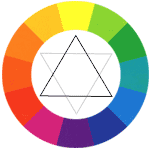 The Painter's Best Friend - To begin to understand color, you'll have to think like a painter. Now, don't go out and start throwing paint around like Jackson Pollack; I mean simply that you need to think in terms of red, yellow, and blue. When you're working with your beloved computer, colors are displayed in percentages of RGB (red, green, and blue) light using an additive method. This means that, as more of each color is added, you get closer to white light. In contrast -- no pun intended -- painters use a subtractive color method. So, by asking you to think like a painter, I really mean that I want you to think about colors as combinations of red, yellow, and blue, and to realize that, as you add colors, you get closer to black.
 Analogous - Analogous colors are those that are adjacent to each other on the color wheel. If you pick any range of colors between two points of either triangle on our color wheel (ie yellow to red, orange to violet, red to blue, etc), you will have an analogous color scheme. While I was taking an introductory design class at UCF, we were given a still life, and one class period to paint it using whatever color scheme we were studying. Risking public ridicule in the interest of avoiding copyright infringement, I'll use these as my color scheme examples. This still-life has an analogous color scheme achieved by mixing only yellow and blue acrylic paint.
  Complementary - Complementary color schemes consist of colors that are located opposite each other on the color wheel, such as green and red, yellow and violet, or orange and blue. These colors are said to complement one another. When placed next to each other, a phenomenon known as simultaneous contrast occurs, wherein each color makes the other look more vibrant.
 Monochromatic - If you mix white with a pure color, you produce tints of that color. If you mix black with a pure color, you get shades of that color. So, what do you get if you create an image using only the tints and shades of one color? A monochromatic color scheme. This example is yet another of color-theme based still life, and consists of only tints and shades of the color orange.
 The funny thing is that when you have the status bar at the bottom of your web browser visible and you hold your pointer over the link, you can usually see where it will really take you if you clīck it; and typically, this is a totally unrelated domain (often only a numeric IP address shows) run by a scammer out to collect your personal information. Many people don't notice these details while browsing, and it has been reported that up to 5% of the "phished" fall victim to the scam.
