|
|
Smiley Face Turns 20 ... Sept. 19th :-)
From
www.CNN.com
It was 20 years ago today that Scott Fahlman taught the 'Net how to smile. The IBM researcher has devoted his professional life to artificial intelligence, the practice of teaching computers how to think like humans.
Fahlman is known for his work with neural networks -- a computer technique designed to mimic the human brain -- and helping develop Common Lisp, a computer language that uses symbols instead of numbers, but the bearded scientist is perhaps best known for a flash of inspiration that helped to define Internet culture, in all of its ungrammatical glory.
On September 19, 1982, Fahlman typed :-) in an online message.
The "smiley face" has since become a staple of online communication, allowing 12-year-old girls and corporate lawyers alike to punctuate their messages with a quick symbol that says, "hey, I'm only joking."
For more info: The Smiley Dictionary -
What is a Smiley?
99% of All Web Sites are Obsolete!
From
www.Digital-Web.com
(Note from Rich: Be
aware that when ever I design a site, it IS
compatible in the following browsers: IE5/6, NN4/6/7 & Opera 5/6! THIS
IS MY JOB as a PROFESSIONAL! Maintenance is also extremely important, so that your information
on your site is accurate and current!) Here is the article ...
An equal opportunity disease afflicts nearly every site now on the Web, from the humblest personal homepages to the multi-million-dollar sites of corporate giants. Cunning and insidious, the disease goes largely unrecognized because it is based on industry norms. Though their owners and managers may not know it yet, 99.9% of all websites are obsolete.
These sites may look and work all right in mainstream, desktop browsers whose names end in the numbers 4 or 5. But outside these fault-tolerant environments, the symptoms of disease and decay have already started to appear.
Backward Thinking
Peel the skin of any major site, from Amazon to Microsoft.com, from Sony to ZDNet. Examine their tortuous non-standard markup, their proprietary ActiveX and JavaScript (often including broken detection scripts), and ill-conceived use of Cascading Style Sheets—when they use CSS at all. It's a wonder such sites work in any browser.
They work in yesterday's mainstream browsers because the first four to five generations of Netscape Navigator and Microsoft Internet Explorer did not merely tolerate non-standard markup and browser-specific code; they actually encouraged sloppy authoring and proprietary scripting in an ill-conceived battle to own the browser space.
Often, non-standards-compliant sites work in yesterday's browsers because their owners have invested in costly publishing tools that accommodate browser differences by generating multiple, non-standard versions tuned to the biases of specific browsers and platforms. This practice taxes the dial-up user's patience by wasting bandwidth on code forking, deeply nested tables, spacer pixels and other image hacks, and outdated or invalid tags and attributes.
Say you don't mind losing up to 25% of the people who choose to visit your site. The "IE-only" approach still makes no sense, as there's no guarantee that IE (or even desktop browsers as a category) will continue to dominate web space.
The Disease
Early in a computer programmer's education, he or she learns the phrase: "Garbage In, Garbage Out." Put simply, in the world of programming, if you write your code correctly, it works. If you write it incorrectly, it fails. Languages like C++ and Java don't merely encourage proper coding practices, they demand them.
Likewise, among the first things a graphic designer learns is that the quality of source materials determines the effectiveness of the end product. Start with a high resolution, high quality photograph, and the printed piece or web graphic will look good. Try to design with a low quality snapshot or low-resolution web image, and the end result won't be worth viewing. You can turn a high quality EPS into a suitably optimized web page logo, but you can't convert a low-resolution GIF into a high quality web, print, or TV logo. "Garbage in, garbage out."
But as newer browsers comply with web standards, they are becoming increasingly rigorous in what they expect from designers and developers, and thus increasingly intolerant of broken code and markup. "Garbage in, garbage out" is beginning to take hold in the world of browsers, making knowledge of web standards a necessity for anyone who designs or produces websites.
The Cure
After a long struggle pitting designers and developers against the makers of leading browsers, we can finally employ techniques that guarantee the appearance and behavior of our sites, not simply in one manufacturer's browser, but in all of them.
September Search Engine News
From
www.searchengine-news.com Google's - Google updated the majority of their index approximately August 28th based on the content they gathered around July 31st. It should be noted, however, that sites with a high page rank and/or news content appear to be updated more frequently and much faster – some within 24hrs. New URLs that are submitted also get into the index quickly, recently as fast as 24hrs.
Google Page Rank For Sale - A new twist in Internet advertising was recently unveiled by PR Ad Network. Their strategy is to run text-based advertising on specific sites that score highly within Google's PageRank (PR)system (exceeding PR 5) for a flat fee. The links from these high-PR-sites to the advertisers' sites will theoretically cause the advertiser to rank higher at Google due to these text-based keyword specific links coming from what Google considers to be "important" pages.
We suspect Google will attempt to detect and penalize – perhaps even ban – sites that are participating in this new ad concept designed to piggyback on the success of Google's PR system.
MSN at the end of August suddenly dropped the Direct Hit link from their search results. Direct Hit is missing from Lycos now as well but is still part of the top search results at HotBot.
HotBot - No major changes at HotBot this month.
AltaVista Increases Overture Listings - During August AltaVista dropped their "Skyscraper Ads" that were running on the right side of the page and replaced them with more listings from Overture.
AltaVista drops Meta Keyword tags, changes Algorithm - AltaVista is no longer indexing the meta keyword tag but continues to index up to 1129 characters within the meta description tag and up to 238 characters within the title tag. This change has had an affect in many search results since some pages only had their keywords in the meta keyword tag.
Lycos Changes Descriptions - Lycos has changed their search results. Now they are showing body text instead of the meta description tag information similar to Google's search results. Alltheweb.com, however, is still showing the old format based on the meta description.
DMOZ - No significant changes this month at ODP.
LookSmart Update - have they learned? Following up on LookSmart's poor handling of the switch to Pay-Per-Click listings we can tell you that at least some of their employees have openly admitted the switch was handled very poorly.
A word to the wise: If you're already listed in the top 3 at Overture for the keywords that you want, there is little need for a LookSmart Listing because it would likely be redundant. Otherwise, if the LookSmart 15¢-a-click rates represent an attractive ROI opportunity then you might want to setup an account for testing and see if they work for you.
Yahoo has been testing different search results throughout August in what appears to be a prelude to the final decision on who their search partner will be. From top to bottom, here's what they've apparently settled on for the new search results layout...
Inside Yahoo! Matches - only shows for popular generic phrases
Category Matches - only the category listings, no individual site listings
Sponsor Matches - top 3 listings from Overture
Web Site Matches - top 20 listings of sites in their directory
More Sponsor Matches - more results from Overture
Overtures new Match Driver changes -Overture recently sent an email to all advertisers about their new Match Driver feature. In the past they've matched up singular and plural forms of words but this new features goes much further.
"It looks at your term, title and description to match your listings to searches where we believe the intent of the user is to find your product or service even though they have not typed in the exact keywords you've bid on. " In order to maintain your competitive advantage in the search results, we take your highest max bid on any form of that search term."
Be sure to carefully read Overture's FAQ on this subject because it's quite likely you'll be paying your max bid for a phrase that you have not specifically requested.
Lesson on Colors  or Colours! from or Colours! from  Colour is
something you can't escape, and as it's something we all focus
on day in, day out, it's fairly important that you understand
at least this basic element. Colour has 3 basic characteristics:
Hue - distinguishes one colour from another
Colour is
something you can't escape, and as it's something we all focus
on day in, day out, it's fairly important that you understand
at least this basic element. Colour has 3 basic characteristics:
Hue - distinguishes one colour from another
Tone - affects the quality of brightness, lightness
or darkness of colour
Chroma - affects the quality of saturation, or the
intensity of the colour
Colours can affect what we think and feel: our moods. The
reaction we have to a design -- anger, warmth, power, purity
-- can all be bought into an image through the use of colour.
Black: The colour of authority and power.
White: Innocence and purity.
Red: Red is the most stimulating colour on the colour
wheel. It can stimulate faster heart rate, influence rage
and or anger, and can also stimulate appetite.
Blue: Blue invokes peace, tranquility and loyalty,
but can also be cold and depressing.
Green: A difficult colour to master, yet it is one
of the most relaxing (hence green rooms at TV stations).
Dark green is masculine and conservative, and implies wealth.
Purple: is the colour of royalty, and gives the impression
of luxury, wealth and sophistication.
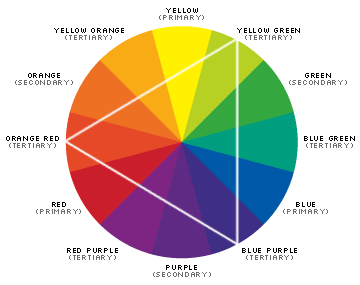  The colour wheel was invented through the basic theory of
bending the spectral range of light into a circle containing
seven different colours.
The colour wheel was invented through the basic theory of
bending the spectral range of light into a circle containing
seven different colours.
Since the invention of the colour wheel, artists have
agreed (no mean feat!) that it represents the easiest way
to choose complimentary colours. Within the colour wheel
there are three classes of colour:
Primary: These are believed to be the fundamental
three colours. They cannot be created by combining any other
colours on the wheel, and they form the basis for all other
colours.
Secondary: Secondary colours are made with the following
formula:
Primary+Primary=Secondary, for example:
Red + Blue = Violet
Purple, Red + Yellow = Orange
Blue + Yellow = Green
Secondary colours lie between the primary colours.
Tertiary: Tertiary colours are created with this
formula: Primary+Secondary=Tertiary
Using Triads to Select Colour Schemes
Triads are colour schemes that are connected within the
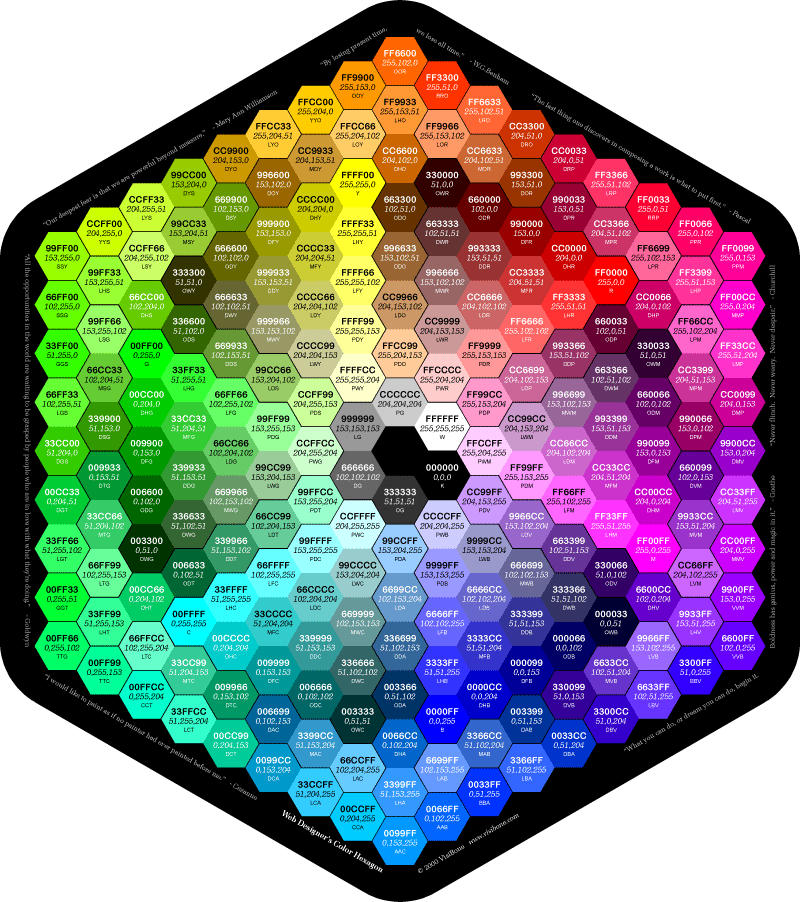
colour wheel by a triangle. Using the RGB hex value, you
can easily create complementary colour schemes by shifting
the values around in groups of two, like this: RRGGBB, BBRRGG,
GGBBRR
For further info on colors, try Color
Schemer for a great way to match your intended color
w/ web safe colors.... Or any more of these sites: Web
Site Tips #1, Web
Site Tips #2, Web
Site Tips #3, Web
Site Tips #4, Building
Web Colors, Color
Conversion Chart and a GREAT
COLOR CHART!!!.
This is my mousepad, & you can also purchase it @ VisiBone.com
336-408-9075
Rich@RichsWebDesign.com
|
|