 "The Truth about SEO"
1.Most people are tired of hearing a lot of sales hype.
"The Truth about SEO"
1.Most people are tired of hearing a lot of sales hype.
2. Designing a web site is relatively easy, but this is only 50% of the job.
3. What is your favorite search engine? 98% will say Google, Yahoo, MSN or AOL.
These are the major search engines that should be considered.
4. Did you know that "HITS" are irrelevant? A HIT is really
an action from the server. In other words, a hit occurs
for each and every element downloaded. Targeted unique VISITORS are much more important!
5. The best success formula is often a cross between re-writing content especially for high search
engine placement COMBINED with copywriting that is written for the human brain.
6. The reason pages score well with major search engines is because they are built with honest,
content-rich pages without the use of any types of tricks, gimmicks or spam.
7. Search Engine Optimization is one of the biggest missing links in this whole web development
industry. It's safe to say that building a web site without a plan for search engine
optimization, is the single most expensive lesson that any dot com business has
ever had to learn in the last few years.
8. "Show me the Results"
Google
Update Pattern From
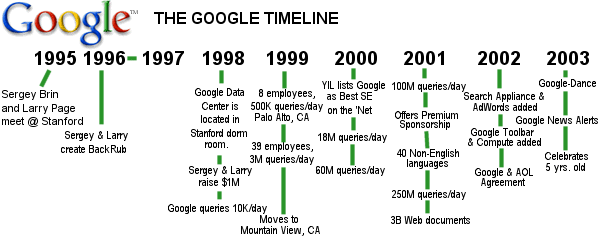
 Ever since the last Google update in late June, there has been wide speculation whether there would be any more "Google Dance" updates. As you recall, the "Google Dance" was about a 4 day period of time occurring about every 30 days when Google updated their entire index and SERPs (Search Engine Results Page).
After observing Google for a little more than 2 months, we can now report that Google is now conducting a "rolling update". Position Research has plotted Google ranking movements for more than 60 URLs covering more than 500 keywords over a 60 day period of time. Three general observations can be made.
Incremental ranking movements were observed about every 4-5 days. These observations were most prominent in campaigns that were young and had ongoing link optimization efforts. Perhaps Google was incrementally attributing partial value from newly crawled links.
Large ranking movements took place within a 25-30 day period. Google backlink counts changed within 5-7 days following.
Different websites seem to be receiving their large ranking movements at different times. Although difficult to tell, there appears to be evidence to support an Alpha sort order (e.g. URLs starting with the letter B receive large ranking movements just prior to URLs starting with the letter C). Since this observation only applied to young campaigns where large movements could be observed, the sample set was small and was not statistically significant (a fancy way of saying it could be coincidence).
September
Search Engine News From
www.searchengine-news.com Google - New Google Calculator Feature. Google implemented a very-cool set of calculator features to their engine during August. To use the calculator just type the expression into the main search box and Google will return the result. For a more detailed explanation of all the features available and how to use them, see this month's resource article, Search Engine Calculators.
Google Toolbar Update - Google has automatically updated the version of their toolbar to contain several new features (some were previously in a beta version).
New features automatically added to the toolbar include a Pop-up Blocker, Form AutoFill and a BlogThis posting features.
Overture - Overture released a number of new features during August...
1. Broad and Phrase Matching - In a new take on what was the Match Driver feature, Overture now offers phrase and broad matching available along with standard matching. The new features give you some additional flexibility in your keyword selection and also affect the price you pay.
2. Conversion Tools – Overture now has a Conversion Counter available which can track sales, sign ups and other conversion information.
Inktomi - See the Yahoo section for some upcoming changes regarding Inktomi.
AltaVista - AltaVista launches new tool bar
Fast - claims they're the Biggest on the Block - Overture announced on August 21st that their Fast search engine now has the world's largest search index containing 3.2 billion documents. According to Overture, this is an increase of over 1 billion documents.
MSN - No major changes at MSN
ODP - Important reminder: Even if you are having problems getting listed in ODP (dmoz.org) and even if you've waited for weeks, Do NOT resubmit! ...doing so will move your submission back to the end of the line, the bottom of the queue.
LookSmart - No major changes at LookSmart
Yahoo -Get ready for Yahootomi - The whisper in the halls at the San Jose Search Engine Strategies Conference in August was that Yahoo is set to replace Google at any time with Inktomi results to power its default search. We've already seen occasional public testing of the Inktomi results at Yahoo during the last of August.
"SEO vs. SEM - What's the Difference?"
To start with, SEO is "Search Engine Optimization" and SEM is "Search Engine Marketing". What does that mean? ...
Let's use a "brick & mortar" gift shop as an example.
You have just opened a brand new gift shop that specializes in Hummels and spiritual nic-naks. The front of your store is very attractive and
when a customer walks in, it looks like a gift shop should. It is organized so that each area is clearly defined and the check-out process
is logical. You have contacted the local "Yellow Pages" and other phone companies and will be in the new phone books, coming out in 2 months.
The above example shows that you have "OPTIMIZED" your shop ... or new web site. Your new web site also looks attractive, is logically layed-out and functions properly.
You will now show up somewhere in the search engines, hopefully near the top. This may be fine, but do you need advertising?
To market your gift shop, you might want to purchase some air-time ads on a local radio station or even TV station. You should be careful which station you
choose, what time of day, and what type of ad to use. You might want to decorate your delivery van in bright colors. All of these items cost $$ and sometimes works, sometimes does not.
 SEM "Search Engine Marketing" is taking your well-oiled web site and purchasing advertising. At the present, the two best advertising programs for web sites are "Overture" and Google-AdWords.
Both are PPC (Pay-Per-Click) advertising and are targeted to the exact keyword phrase you wish. If you want to attract people in NC who might be interested in Hummels, you might want to
purchase ads for the phrase,"NC Hummel figurines", or "Hummel North Carolina". This way when a person on Yahoo, MSN, AOL, Google, etc. does a search for "Hummel figurines in NC",
your ad will show up at the top of the screen. If that person decides to click your ad, then it would take them to your site. You might have to pay based on $.20 per click, or
set-up an account on a pre-paid basis. SEM "Search Engine Marketing" is taking your well-oiled web site and purchasing advertising. At the present, the two best advertising programs for web sites are "Overture" and Google-AdWords.
Both are PPC (Pay-Per-Click) advertising and are targeted to the exact keyword phrase you wish. If you want to attract people in NC who might be interested in Hummels, you might want to
purchase ads for the phrase,"NC Hummel figurines", or "Hummel North Carolina". This way when a person on Yahoo, MSN, AOL, Google, etc. does a search for "Hummel figurines in NC",
your ad will show up at the top of the screen. If that person decides to click your ad, then it would take them to your site. You might have to pay based on $.20 per click, or
set-up an account on a pre-paid basis.
 Overture and Google-AdWords function differently, but the above principal is the same. If you have a nice shop, that is well organized and has good prices, you might want to market your business by purchasing
targeted ads. Overture and Google-AdWords function differently, but the above principal is the same. If you have a nice shop, that is well organized and has good prices, you might want to market your business by purchasing
targeted ads.
Would it be a good idea to SEM without SEO? Probably not. It's like advertising your new gift shop, before you have carefully
layed out your shop. Do you want visitors BEFORE your shop is ready? Probably not. Do you want visitors to your new web site BEFORE
it is optimized and organized? Probably not.
Optimize your business (SEO) first and get it listed on the search engines. Then purchase your ads carefully to your targeted audience. Good luck!
 As most of you know, this past month was "The Month of the Virus", with 4 major outbreaks and a few other scares. To read articles on each one ...
"SoBig" ...
"LovSan" ...
"W32/Mimail@MM" ... &
"Welchia"
As most of you know, this past month was "The Month of the Virus", with 4 major outbreaks and a few other scares. To read articles on each one ...
"SoBig" ...
"LovSan" ...
"W32/Mimail@MM" ... &
"Welchia"
 Caught Lovsan or Sobig? - Download the latest version of the Avert 'Stinger' virus removal tool to eliminate these threats from your system. Caught Lovsan or Sobig? - Download the latest version of the Avert 'Stinger' virus removal tool to eliminate these threats from your system.
Need some VIRUS definitions, go to the "Virus Glossary" Here!
To make sure everyone knows, DO NOT OPEN ATTACHED FILES, unless ALL of these criteria are TRUE:
1. You know WHO sent you the file ... AND
2. They specifically inform you that an "attached file" in enclosed ... AND
3. You know exactly what the file is! (.exe , .scr & .pif files are the biggest culprits)
Most of these nasty viruses infect a person's PC, and directs that PC to send the same virus to ALL persons in their address book. So if you just go by rule #1, you might receive a note from your
infected friend's PC. You knowing that person, THINK the note is OK, and WHAM, you are now infected! Maybe that same note says, "Open file for details." .... WHAM, you are infected.
If you do not have Anti-Virus protection, read the section below for links to McAfee & Norton/Symantec NOW!
From  -
Other Virus Detection & Prevention Tips -
Other Virus Detection & Prevention Tips
1. Do not open any files attached to an email from an unknown, suspicious or untrustworthy source.
2. Do not open any files attached to an email unless you know what it is, even if it appears to come from a dear friend or someone you know. Some viruses can replicate themselves and spread through email. Better be safe than sorry and confirm that they really sent it.
3. Do not open any files attached to an email if the subject line is questionable or unexpected. If the need to do so is there always save the file to your hard drive before doing so.
4. Delete chain emails and junk email. Do not forward or reply to any to them. These types of email are considered spam, which is unsolicited, intrusive mail that clogs up the network.
5. Do not download any files from strangers.
6. Exercise caution when downloading files from the Internet. Ensure that the source is a legitimate and reputable one. Verify that an anti-virus program checks the files on the download site. If you're uncertain, don't download the file at all or download the file to a floppy and test it with your own anti-virus software.
7. Update your anti-virus software regularly. Over 500 viruses are discovered each month, so you'll want to be protected. These updates should be at the least the products virus signature files. You may also need to update the product's scanning engine as well.
8. Back up your files on a regular basis. If a virus destroys your files, at least you can replace them with your back-up copy. You should store your backup copy in a separate location from your work files, one that is preferably not on your computer.
9. When in doubt, always err on the side of caution and do not open, download, or execute any files or email attachments. Not executing is the more important of these caveats. Check with your product vendors for updates which include those for your operating system web browser, and email. One example is the security site section of Microsoft located at http://www.microsoft.com/security.
10. If you are in doubt about any potential virus-related situation you find yourself in, you may report a virus to our virus team.
336-408-9075
Rich@RichsWebDesign.com
|